One of the ways of making HTTP requests in JavaScript is the fetch() API. The fetch() API is a modern JavaScript API that allows web developers to send/retrieve data across the web.
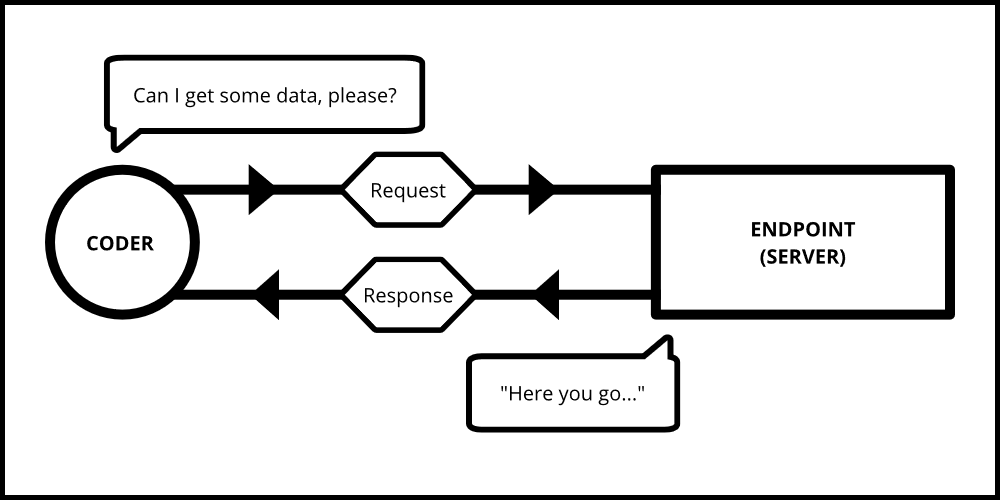
Imagine a scenario where you enter a coffee shop. You go to your barista, and ask for a cappuccino. The barista enters your order on their computer or passes your order along to the other barista. After making your payment, you then wait for your order to come. If it comes, you can start enjoying your coffee. And if there was a miscommunication between you, and the barista, you might get a drink you didn't intend to order.
In the above analogy:
- Your order is the request.
- The endpoint is the barista at the coffee shop.
- The coffee is equivalent to the data/resource we want to retrieve.
- A successful order is a resolve.
- A miscommunication can lead to you getting the wrong drink, which is an error.
Diving Deeper into fetch()
Parameter: a required URL/path to the data you want to fetch, and a set of other options
Return value: a 'Promise' (which is a result that is expected to arrive) that resolves to a 'Response'
For example, GitHub offers an API to retrieve some data about its users. A simple request using this API will look like this:
// JavaScript Code
fetch("https://api.github.com/users").then(function (res) {
  /* Code to be executed */
});
In this case, the https://api.github.com/users is the path to the resource we want to fetch. This particular URL returns or resolves basic information about 30 GitHub users in the form of a JavaScript object.
After sending the request, a Promise is returned. A Promise is an object that results in a value some time in the future. It can be in 3 possible states: pending, fulfilled, or rejected.
- Fulfilled: is a state where the request has been handled successfully, and a response is sent back.
- Rejected: is a state where the request has been denied access to that resource or when there is a network error.
- Pending: is a state where the request is sent, and it isn't fulfilled or rejected yet.
When a Promise gets fulfilled, the then() method can be called to deal with what happens next. It takes in the response received from the request as an argument. The code that is to be executed on this response goes in this block. This method can be chained together to perform a series of tasks which execute once the corresponding previous then() block has finished executing. It follows the order of "Let this block finish executing...then execute this...then execute that...".
Going back to our previous example, after retrieving our user list data from the GitHub API, we can convert that data into JSON format. Then we can simply log it to the console or write a function that could display this data on an HTML page.
// JavaScript Code

fetch("https://api.github.com/users")
  .then(function (res) {
    return res.json(); // Convert the data into JSON
  })
  .then(function (data) {
    console.log(data); // Logs the data to the console
    return data;
  });
A Promise can get rejected for any of these reasons:
- The resource/data we requested didn't exist,
- We're not authorized to access it, or
- We used the wrong URL to the resource.
In such a case, an error will occur. It is important that these errors are dealt with. That's where the catch() block comes in.
The catch() block is chained at the end of the then() blocks, and it is where error handling is performed. It takes an error object as an argument.
// JavaScript Code

fetch("https://api.github.com/users")
  .then(function (res) {
    return res.json(); // Convert the data into JSON
  })
  .then(function (data) {
    console.log(data); // Logs the data to the console
  })
  .catch(function (error) {
    console.log(err); // Logs an error in case there is one
  });
A Few More Examples
This code uses a fake REST API called JSONPlaceholder. According to the documentation of this API, a fetch request returns an array of objects. In this particular case, the code fetches a fake user (object) from a list (array) of users, but it only returns the one with an id of 2.
Code:
// JavaScript Code

fetch("https://jsonplaceholder.typicode.com/users/2")
  .then(function (res) {
    return res.json(); // Convert the data into JSON
  })
  .then(function (data) {
    console.log(data); // Logs the data to the console
  })
  .catch(function (error) {
    console.log(err); // Logs an error in case there is one
  });
Output:
    {
        "id":2,
        "name":"Ervin Howell",
        "username":"Antonette",
        "email":"Shanna@melissa.tv",
        "address":{
            "street":"Victor Plains",
            "suite":"Suite 879",
            "city":"Wisokyburgh",
            "zipcode":"90566-7771",
            "geo":{"lat":"-43.9509","lng":"-34.4618"}
        },
        "phone":"010-692-6593 x09125",
        "website":"anastasia.net",
        "company":{
            "name":"Deckow-Crist",
            "catchPhrase":"Proactive didactic contingency",
            "bs":"synergize scalable supply-chains"
        }
    }
From the output, it's clear that a user is an object with a set of properties. We can continue to chain other then() blocks to perform more tasks on the data we want.
Code:
    // JavaScript Code

    ...
    .then(function(data) {
        const { name, company: { name: companyName }, website } = data

        console.log(
            `My name is ${name}. I work at ${companyName}.
            For more info, you can visit my blog @ ${website}`
        );
    })
    ...
Output:
My name is Ervin Howell. I work at Deckow-Crist.
For more info, you can visit my blog @ anastasia.net.
The web runs on requests, and modern web-native tools like the fetch API help programmers avoid building things from scratch.
Read More
Comments
Join the discussionA nice explanation of fetch API and behind the scenes of it .I am unable to see your HTTP Requests image in your blog.
Thanks. I'm glad you liked it.
That's strange. I can see it on my end. I also have a mirror of my Hashnode blog on my portfolio (if that helps): https://oneminch.dev/blog/intro-to-fetch-api
Yeah I can see it there. Thanks!!